

Set a fallback redirect for a custom domain
Use a domain fallback when a visitor requests a path that does not match a published campaign page. The current KickoffLabs dashboard control is called Root-domain redirect on the domain’s account page.
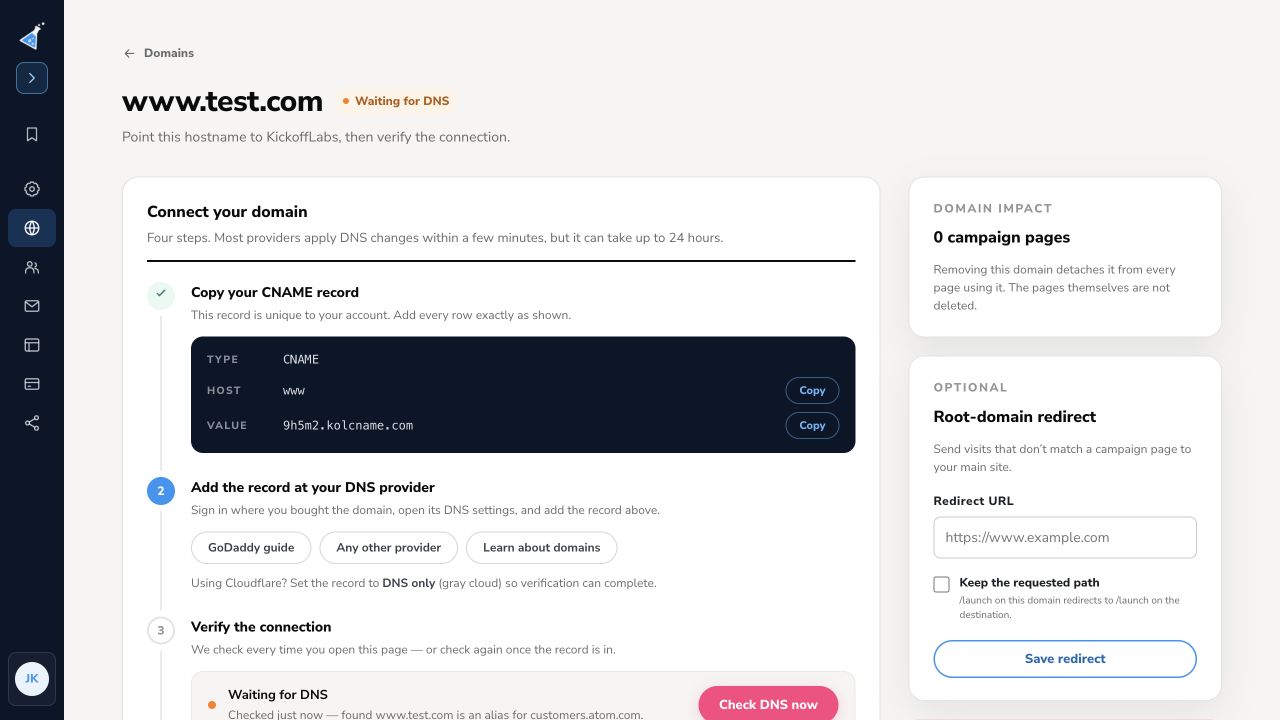
- Open the account menu and select Domains.
- Find the hostname and select Manage. If it has not connected yet, finish the displayed DNS steps and use Check DNS now.
- Under Root-domain redirect, enter the full destination URL in Redirect URL.
- Optionally enable Keep the requested path. For example, a request to
/launchon this domain can redirect to/launchon the destination. - Select Save redirect.
The domain page says this sends visits that do not match a campaign page to your main site. It is an account-domain setting, not a campaign page in the editor. Publishing a page to a matching path still takes precedence.
After saving, test the connected hostname with one published page URL and one intentionally unmatched path. Confirm the first opens the campaign page and the second reaches the expected destination. DNS changes and HTTPS behavior cannot be proven from a local test domain; verify them on the actual connected hostname. See connect a custom domain.
Need help? Email support@kickofflabs.com with the hostname, unmatched path, expected destination, and observed result.