

Filter and segment leads
Open your campaign and select Leads. The audience rail includes Everyone, Top referrers, and Flagged, plus your saved audiences. The number above the list shows both total leads and the number matching your current view.
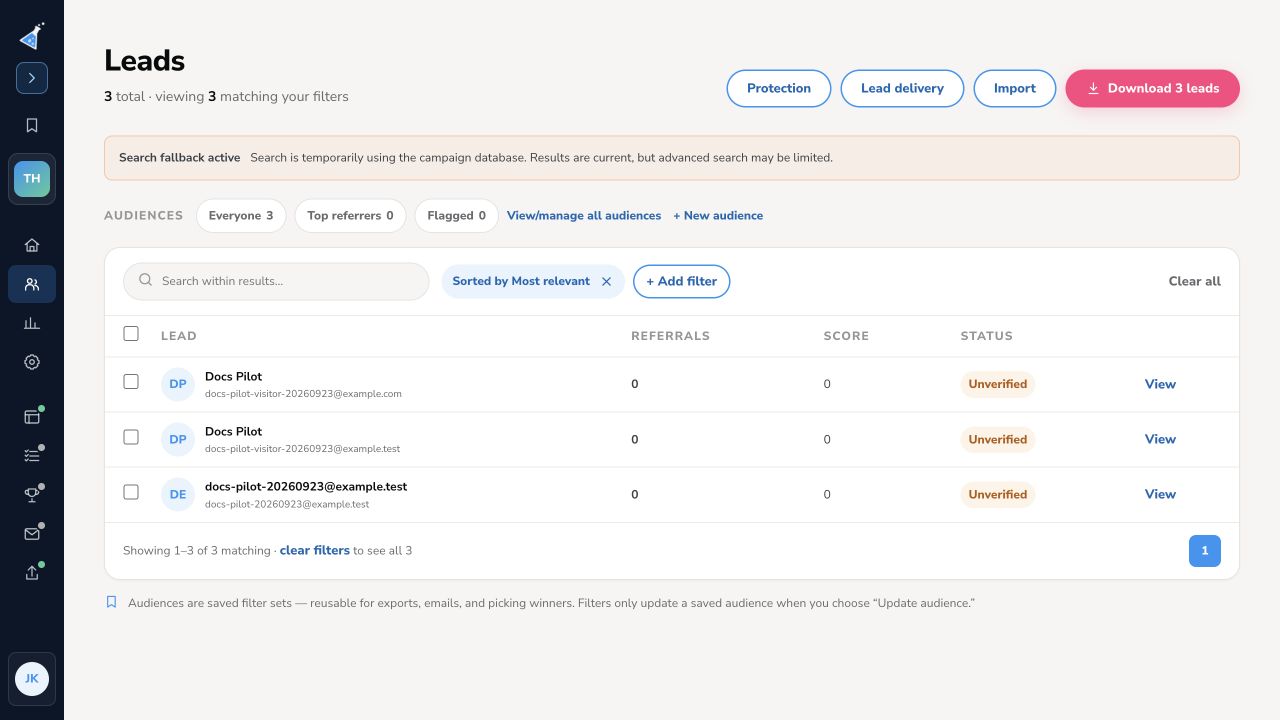
Find a lead or build a segment
Section titled “Find a lead or build a segment”- Use Search within results for a name or email address.
- Select + Add filter, then choose a Field, Operator, and value. Fields include status, contest score, signup source, referral count, signup date, and UTM values.
- Use + And to require another condition or + Or to include an alternative. Select Apply to update the lead list.
- Check the matching count and inspect a few rows. Select Clear all to return to the unfiltered campaign list.
When campaign search is temporarily using the database fallback, the page says so. Results remain current, but advanced search may be limited; verify a critical segment before exporting or sending to it.
Save and reuse an audience
Section titled “Save and reuse an audience”Choose Save as audience from the filter panel, or + New audience from the audience rail. Name the audience and save its conditions. Use View/manage all audiences to find saved sets later. A saved audience is a reusable filter set for exports, emails, and picking winners. Changing the current filters does not update a saved audience unless you choose Update audience.
To export the visible segment, select Download N leads. See the export guide.
Need help? Email support@kickofflabs.com with your campaign URL, the filter conditions, and the result you expected.