

Deliver a digital download after signup
Offer a PDF, ZIP, or another file after someone joins. A lead-magnet page can show the download after signup on Free. An automatic reply is a separate delivery choice with its own plan and sender requirements.
Prepare the file
Section titled “Prepare the file”Upload a supported file up to 50 MB in Account → Asset library, or host it at an address you control. Open the file’s URL to confirm it contains the intended download. A normal public file URL can be forwarded; it does not provide exclusive access for a particular lead.
Connect the on-page download
Section titled “Connect the on-page download”- Open the lead-magnet page under Pages & forms → Edit.
- Select Settings → Page → Download after signup.
- Paste the hosted Download URL, or select Choose or upload a file.
- Set the Button label to describe the file, such as “Open the camera checklist.”
- Check Post-signup and Preview, then publish the page when ready.
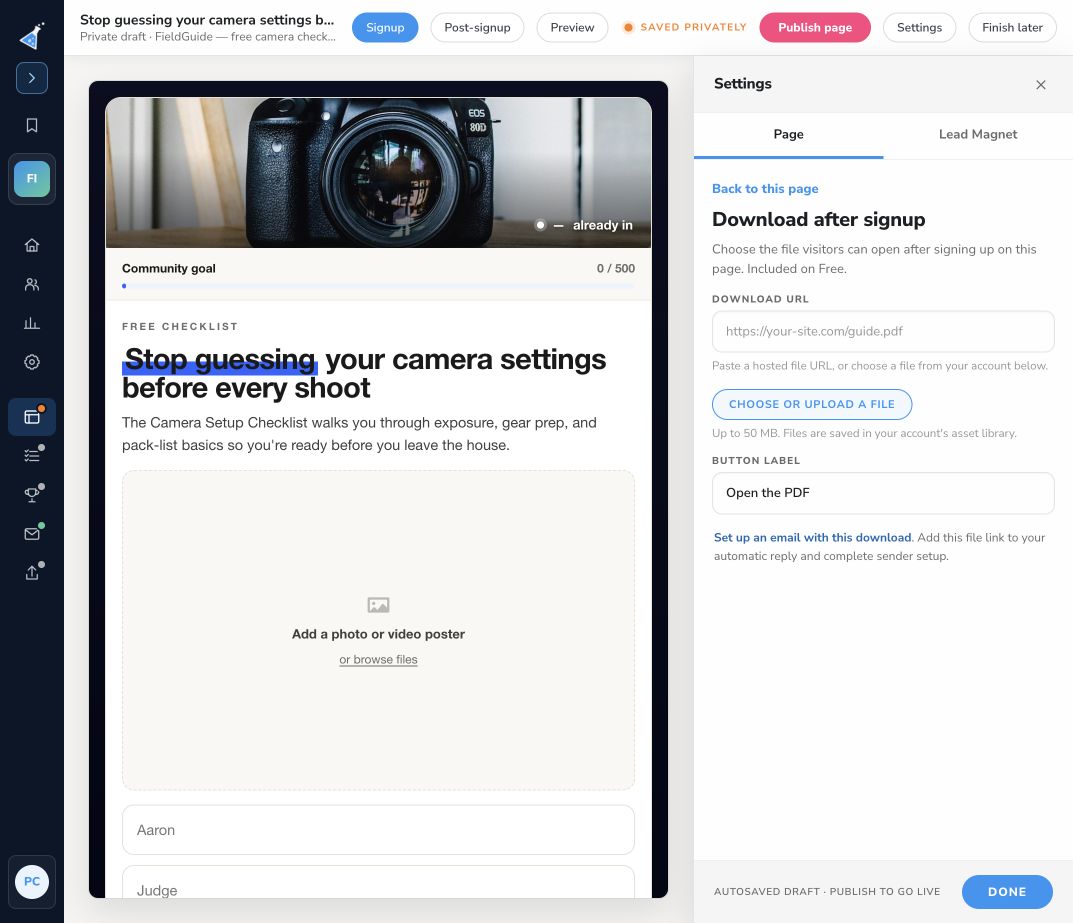
The download control appears on pages with a download section. If you need a new one, create a free-download campaign. Generated pages do not include your actual file. A missing or invalid download URL must be corrected before publishing.
Add email delivery if wanted
Section titled “Add email delivery if wanted”Open Emails → Automatic reply. Add a link to the file, or use {% status_page_link Open your download page %} when that lead’s campaign status page contains the download. Complete Sender & compliance, save the message, and enable it when you want it to send. Connecting an on-page file does not insert that URL into an email automatically.
Follow Test campaign emails to check formatting and delivery.
Test as a visitor
Section titled “Test as a visitor”Publish and test the campaign, then submit the live form with a fresh test address. Open the post-signup download button on desktop and mobile. Confirm the intended file opens and the lead appears in Leads. Check the received email independently if enabled.
If the button fails, check its saved URL and the latest published page version. Include the campaign URL, page URL, file type, and failing step when contacting support.