

Use a lead tag action
A lead tag can organize leads, award points, or both. Use one for an event outside KickoffLabs, such as a purchase or survey completion. You can also show an Apply a Tag action that tags a lead when they click it.
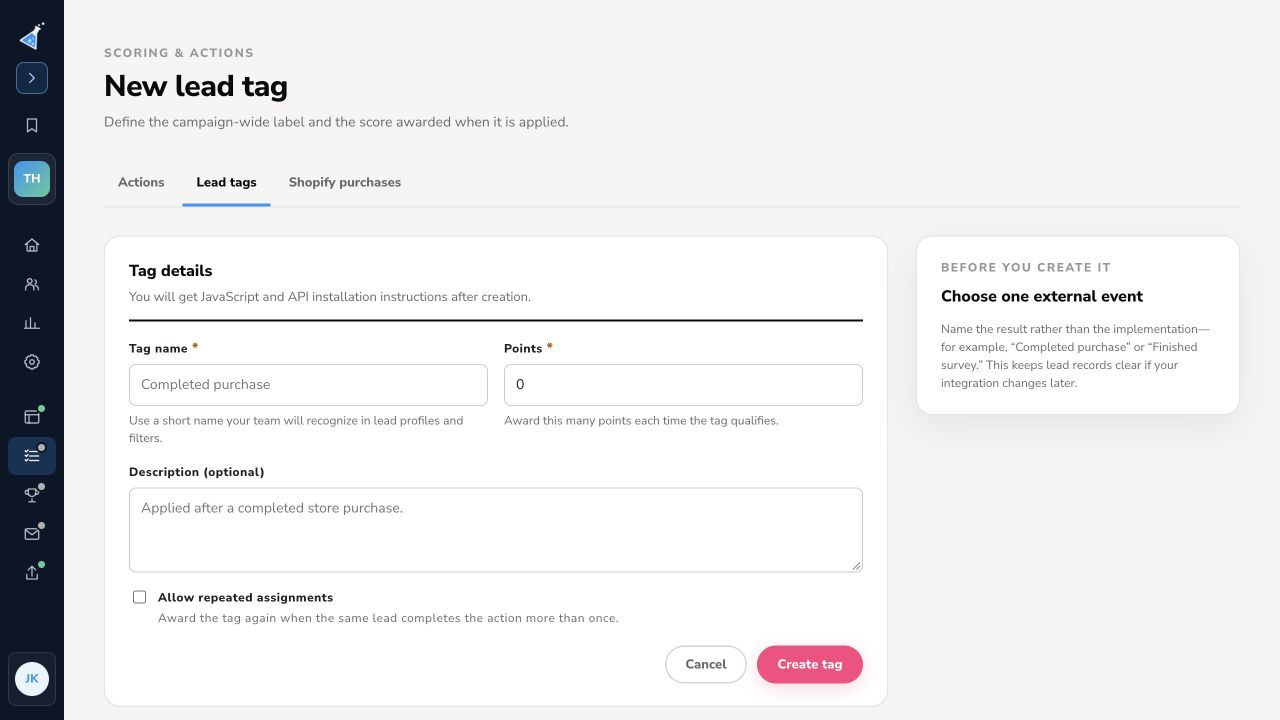
Create a campaign tag
Section titled “Create a campaign tag”- Open Scoring & actions → Lead tags and select + New tag.
- Enter a recognizable Tag name, the Points awarded when it qualifies, and an optional description.
- Choose Allow repeated assignments only if the same lead may earn this tag more than once.
- Select Create tag. The next screen provides JavaScript and API installation instructions.
Tags can be applied through JavaScript, the public API, Shopify purchase tracking, or manually on a lead. Test the actual outside event and inspect the lead’s tag and score before launch. See using lead tags for custom actions for the integration patterns.
Show a tag action to leads
Section titled “Show a tag action to leads”In Scoring & actions → Actions, select + Add an action → Apply a Tag. Set its label and points, select the campaign tag, and choose whether to show the action to leads. The picker describes this as a click action with no destination URL. Use an external integration when completion must be verified outside KickoffLabs; a click alone does not prove that the outside event happened.
Need help? Email support@kickofflabs.com with your campaign URL, tag name, and a test lead email.