

Create a reward-level campaign
In a reward-level campaign, people earn points for joining, referring friends, and other actions. When they reach a milestone, such as 3 referrals, they unlock a named reward. This guide walks through building one in the dashboard and testing that a milestone actually unlocks.
Still choosing the rewards? The milestone referral program guide on kickofflabs.com covers picking thresholds, reward ideas by business type, and budgeting fulfillment. The Referral Programs guide has the full strategy series. This article covers the setup.
Pick the right recipe
Section titled “Pick the right recipe”| Recipe | Where to find it | Use it when |
|---|---|---|
| Referral Rewards | Milestone rewards | You want a standalone referral program with tiered rewards. |
| Newsletter Referral | Milestone rewards | Readers earn rewards for bringing other readers to your newsletter. |
| Waitlist + Milestone Rewards | Waitlist | The main goal is a prelaunch waitlist. See Create a waitlist campaign. |
| Giveaway + Milestone Rewards | Giveaways | You’re running a prize drawing and want guaranteed rewards on the way. |
Build it step by step
Section titled “Build it step by step”-
Choose the recipe and describe your campaign
Section titled “Choose the recipe and describe your campaign”From Campaigns, select + New campaign, open Milestone rewards, and pick Referral Rewards or Newsletter Referral.
Under Describe your campaign, write two or three sentences. Name who it’s for, what you offer, and the rewards people can unlock. Open Customize your draft to choose Compact (a signup box) or Long Form (a full page), a tone, and a starting style. Then select Create my draft.
-
Set how people earn points
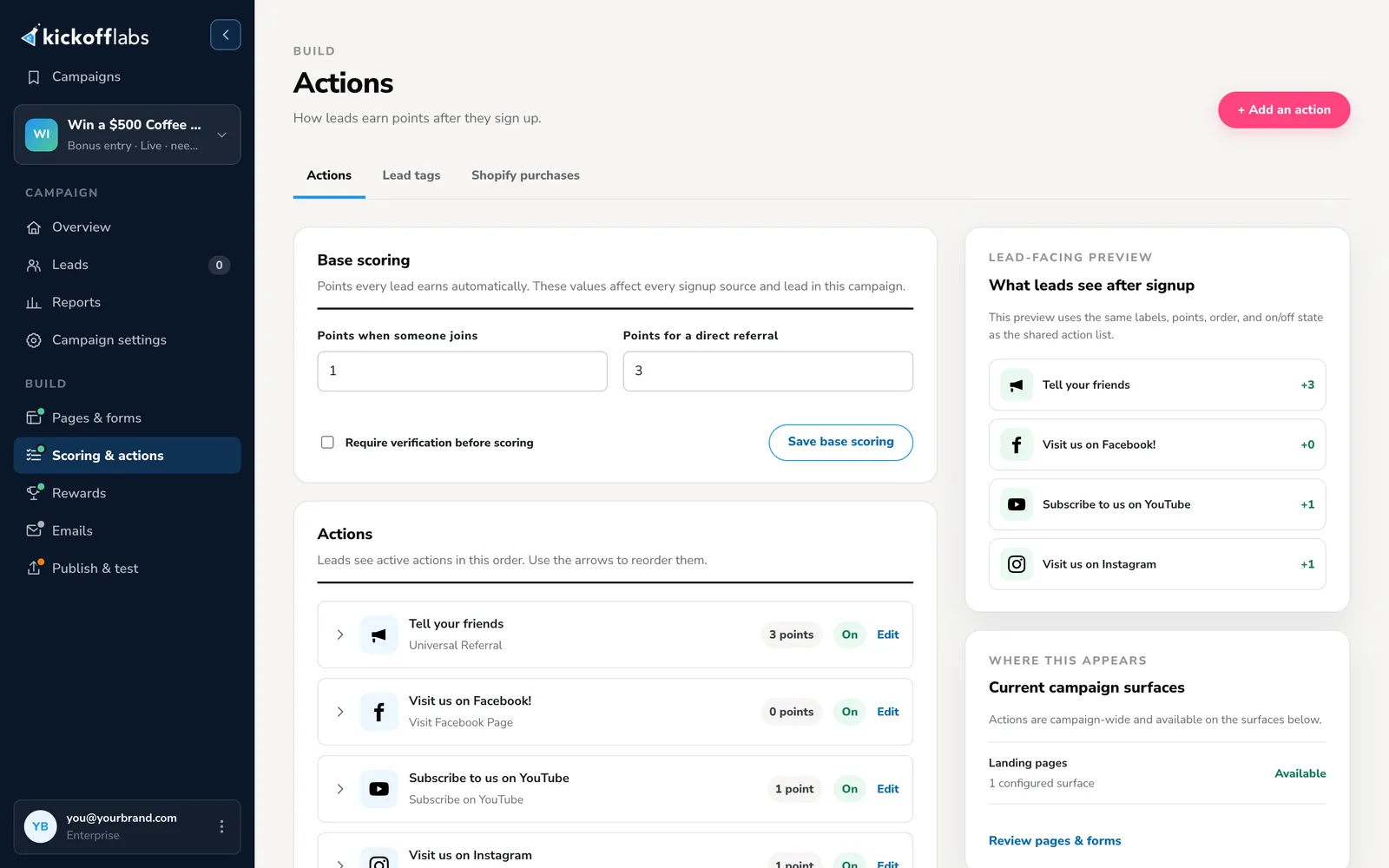
Section titled “Set how people earn points”Open Scoring & actions. Under Base scoring, set Points when someone joins and Points for a direct referral, then select Save base scoring. Add actions if people should also earn points for things like following you on social media.
-
Set your reward milestones
Section titled “Set your reward milestones”Open Rewards. Each milestone has a name and a point threshold, and each threshold must be unique. Select a milestone to edit it, or select Add a reward milestone.
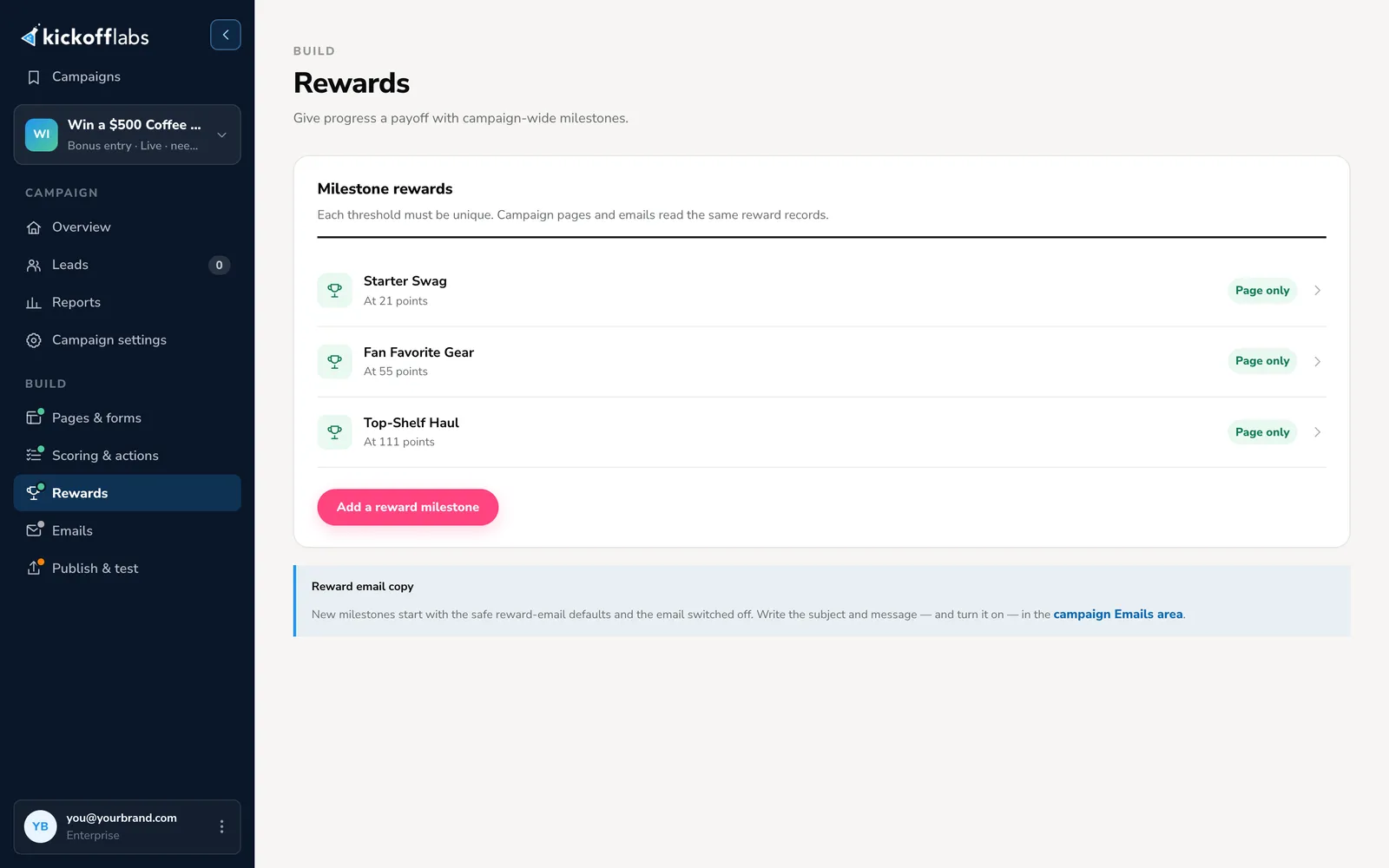
Thresholds are in points, not referrals. To make a reward unlock at a number of referrals, multiply. For example, if a direct referral is worth 3 points and joining is worth 1, then 3 referrals is 1 + 9 = 10 points.
-
Check the rewards on your page
Section titled “Check the rewards on your page”Open Pages & forms and select Edit on your page. Check the reward descriptions on the Signup view, then switch to Post-signup. That view should show each person their points or referrals, the rewards they’ve unlocked, the next milestone, and their share link.
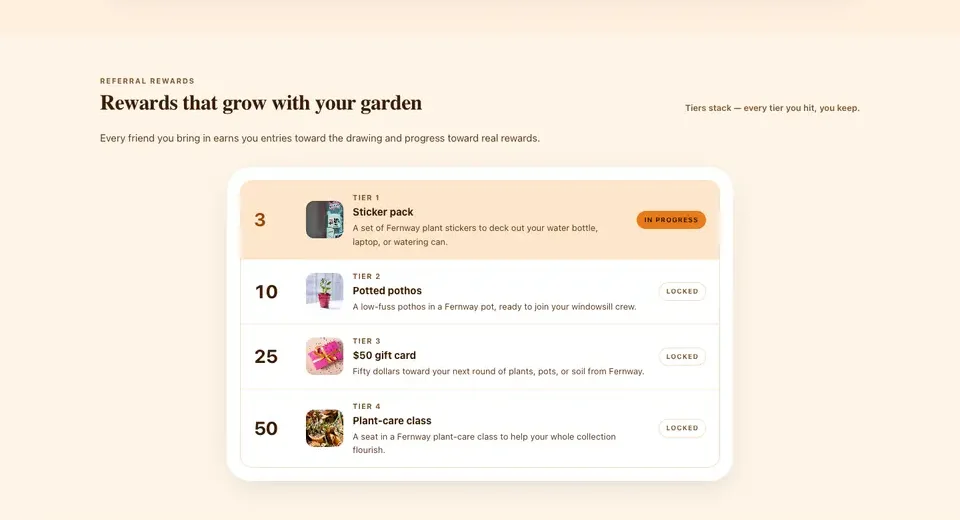
Pages and emails read the same reward records, so a name or threshold you change in Rewards updates everywhere. Recheck the page after any change.
-
Turn on reward emails
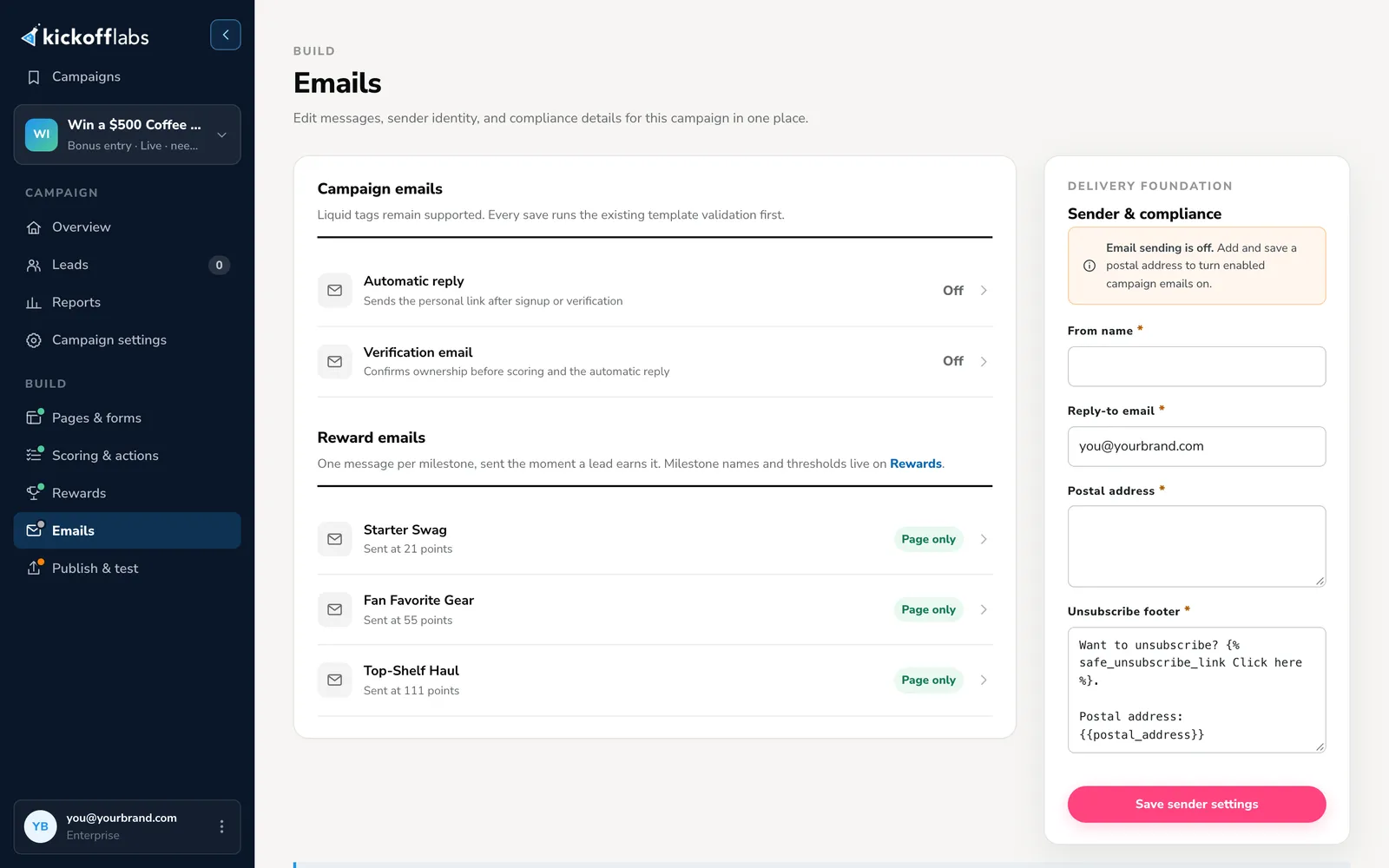
Section titled “Turn on reward emails”Open Emails. Each milestone has its own reward email, sent the moment someone reaches it. New reward emails start switched off. Open each one, write the subject and message, including how to claim the reward, turn it on, and save it. If you turned on Require verification before scoring, turn on the Verification email too, or referrals will never count.
-
Publish and test a milestone
Section titled “Publish and test a milestone”In the designer, select Preview to check both views on desktop and mobile, then publish. Open Publish & test and select Run signup test.
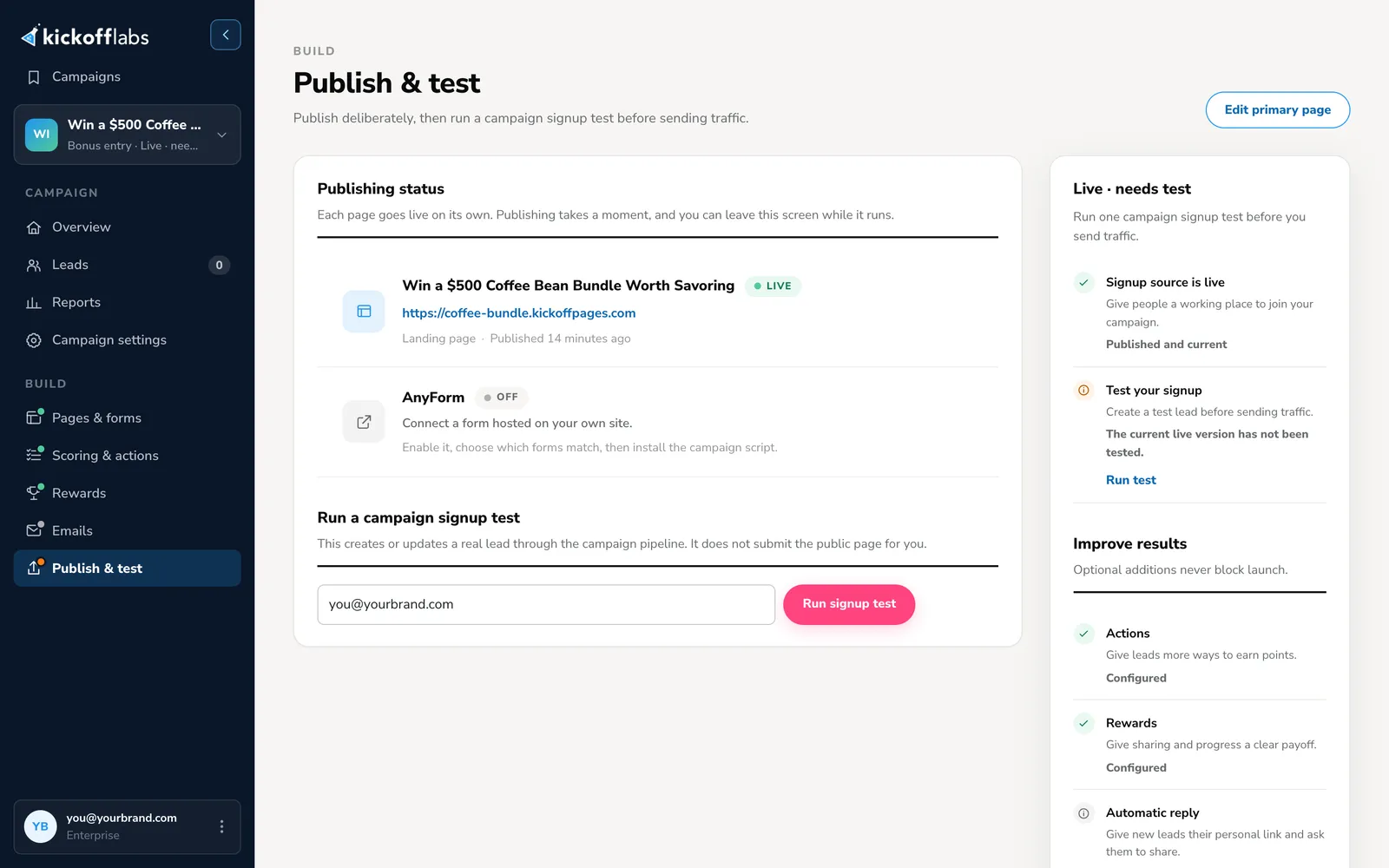
Then cross the first milestone yourself:
- Sign up on the public page and copy your share link.
- Open the link in a private window or another browser and sign up with other email addresses until you reach the first threshold. If verification is on, confirm each address from its verification email, or the referrals stay pending.
- Check that the reward shows as unlocked on the post-signup view and in the lead profile, and that the reward email arrived.
If the first milestone needs too many referrals to test quickly, temporarily add bonus points to your test lead.
Tips for rewards people will work toward
Section titled “Tips for rewards people will work toward”- Pick rewards connected to your product. Early access, a free month, swag, or a founder session attract people who want what you sell. A generic gift card attracts people who only want gift cards.
- Give the friend a reason to join too. A welcome discount or bonus resource turns “do me a favor” into “here’s something for you”.
- Write the rules in one sentence. For example, “A referral counts when a new person joins through your link and verifies their email.” Put it on the page and in the reward emails. Edit your terms.
- Budget before you launch. For each milestone, estimate how many people will reach it times what the reward costs to deliver, including shipping.
- Review before you deliver. Check reward winners for suspicious referrals before sending anything valuable. Detect and manage fraud.
Go deeper
Section titled “Go deeper”- Milestone referral program guide: thresholds, reward ideas, and economics.
- Referral Programs guide: the full strategy series.
- Copy Harry’s referral program: a classic milestone rewards launch.
- Newsletter referral program examples: how newsletters reward readers.
- In this help center: How rewards work · Scoring and actions · Set a community goal
Need help? Email support@kickofflabs.com with your campaign URL, the milestone, and the test lead’s score.