

Set a community signup goal
A community goal is a target for the campaign’s total signups. It gives visitors a shared milestone to work toward. It is separate from rewards earned by an individual lead.
Set the target
Section titled “Set the target”- Open Campaign settings.
- Enter a positive whole number in Lead goal, such as 500.
- Select Save campaign settings.
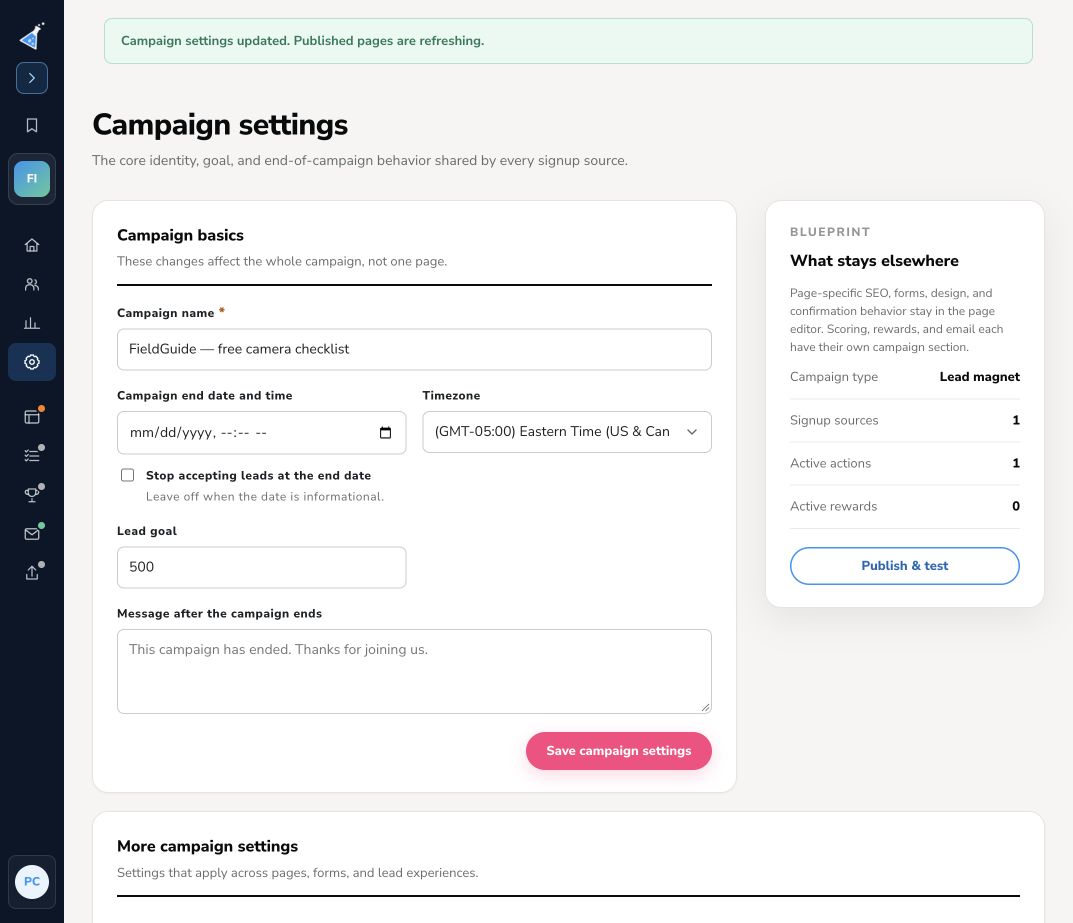
The goal belongs to the campaign, so pages in that campaign share it. Clearing the field removes the target. Setting a goal does not configure a reward or stop signups when it is reached.
Show progress on a page
Section titled “Show progress on a page”Open Pages & forms → Edit. A simple box can display the configured goal in its card; check the preview. On a full page, use Add a section here and choose Community goal. Review the section’s wording, placement, and preview. Explain what reaching the goal means using a promise you can fulfill, then publish the page draft.
If you need each participant to unlock a benefit after referring friends or earning points, configure reward levels instead. If the campaign should close on a deadline, set its end date and stop-accepting option in Campaign settings.
Saving campaign settings refreshes published pages. Choose a stable target and review live progress after changing it.