

Set up scoring and actions
Open the campaign and select Scoring & actions. These rules affect leads from every signup source in the campaign.
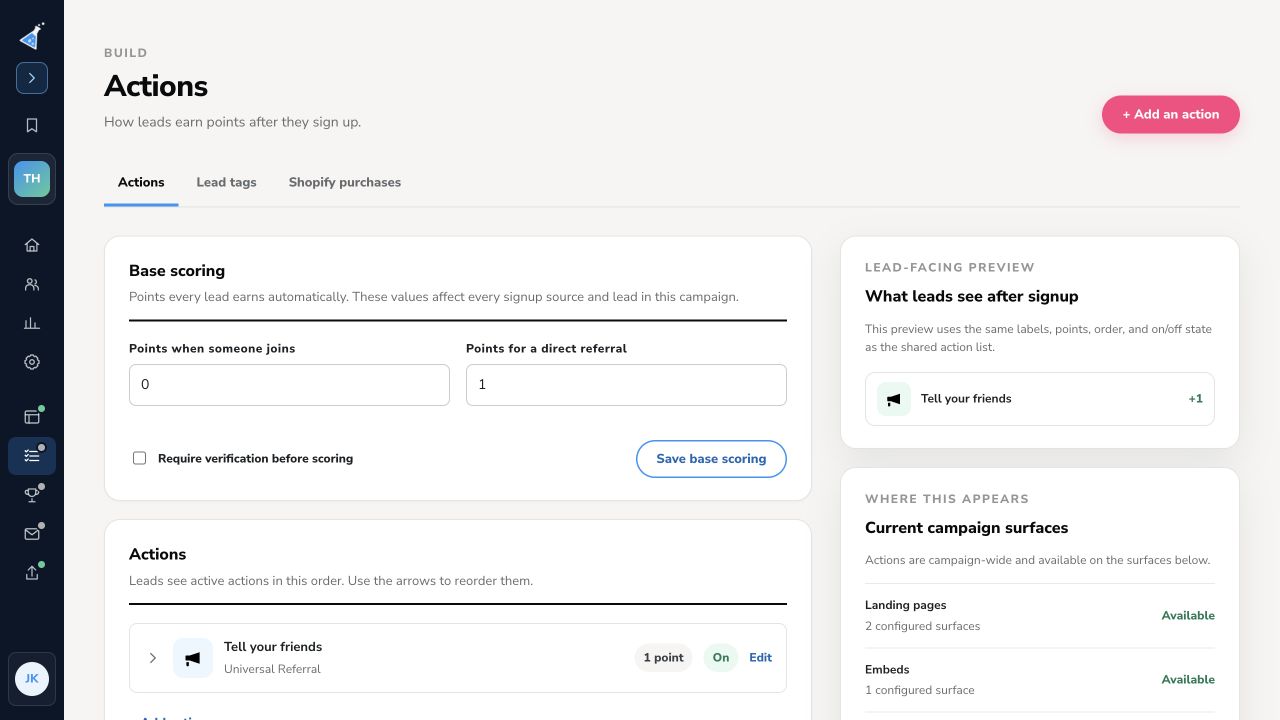
Set base scoring
Section titled “Set base scoring”Under Base scoring, enter Points when someone joins and Points for a direct referral. Turn on Require verification before scoring if referrals should count only after verification. Select Save base scoring. Test a new signup and referral after changing these values; existing lead scores and ranks may need time to update.
Add an action
Section titled “Add an action”Select + Add an action. The picker groups tasks such as visiting a link, connecting a social account, following a profile, sharing the page, referring a friend, joining a community, uploading a file, answering a question, and entering a code. Choose an action, configure its destination or prompt and points, then save it. Use the action’s On/Off state and order controls to decide what leads can see and in what order.
The What leads see after signup preview uses the current action labels, points, order, and on/off state. The Current campaign surfaces section lists where actions are available. A click, share intent, or visit is not always proof that someone completed an external task; choose an action and verification approach that matches your offer. Explore action types.
Use Lead tags for tag-based scoring and Shopify purchases for connected purchase rules. For an exception affecting one lead, record a manual point adjustment.
Need help? Email support@kickofflabs.com with your campaign URL, action name, and the test lead’s expected score.
For external activity, create and manage lead tags. A tag can organize leads with zero points or award points when applied.