Skip to content
Back to KickoffLabs

KickoffLabs actions: reward leads for social shares, referrals, uploads, codes, and custom tasks

Last reviewed: 2026-06-04Reviewed by KickoffLabs SupportApplies to: Campaign actions, bonus points, social actions, uploads, secret codes, and custom lead tasksPlan: Varies by feature

Use this guide to create actions that award leads points for tasks outside the basic signup flow. It consolidates platform-specific action setup into one searchable reference.

Actions are tasks taken outside of KickoffLabs you would like your leads to perform to earn extra points in your campaign, for example visiting a website or following your business profile on Twitter.

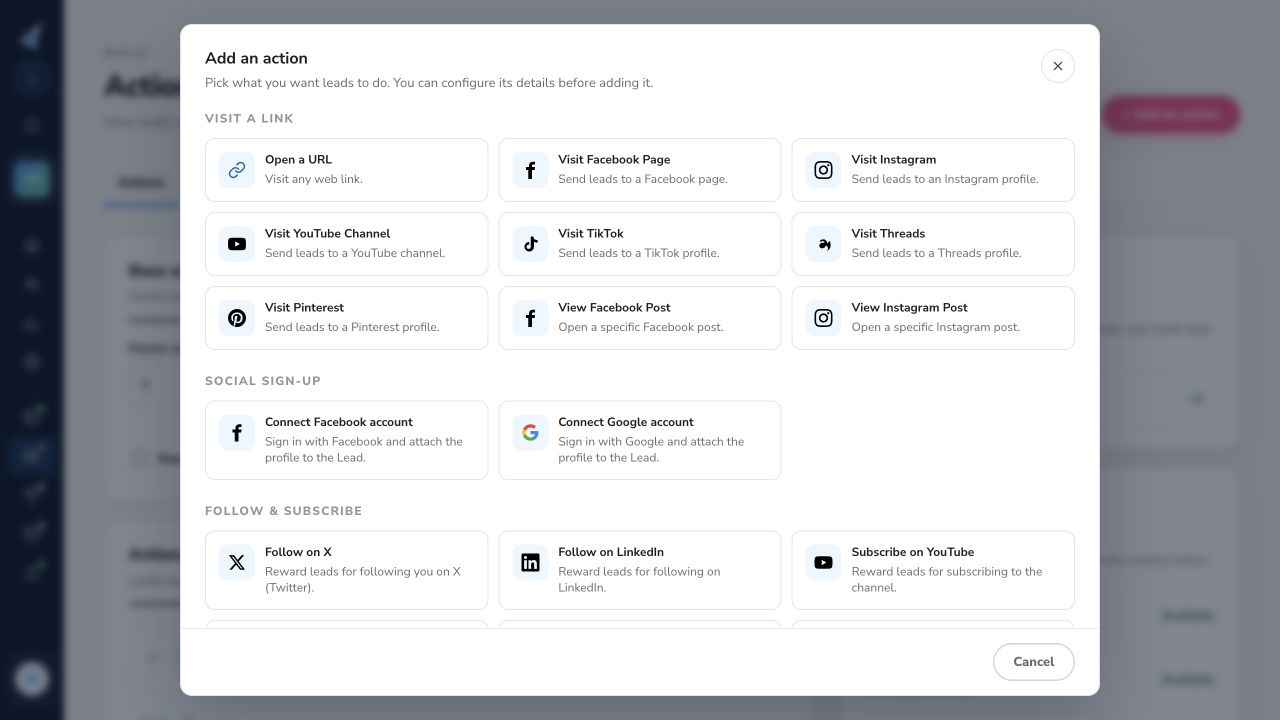
How to Create an Action From the campaign dashboard, select “Scoring” and choose “Action…

Section titled “How to Create an Action From the campaign dashboard, select “Scoring” and choose “Action…”

s.” Here you can add a new action or edit an existing one that you have created.

action editor

Each action can be individually customized for things such as:

  • Setting the amount of points to award for completing the specific action
  • Setting the call to action button text
  • Setting a URL
  • Enabling/Disabling the action from displaying on a page

customize actions

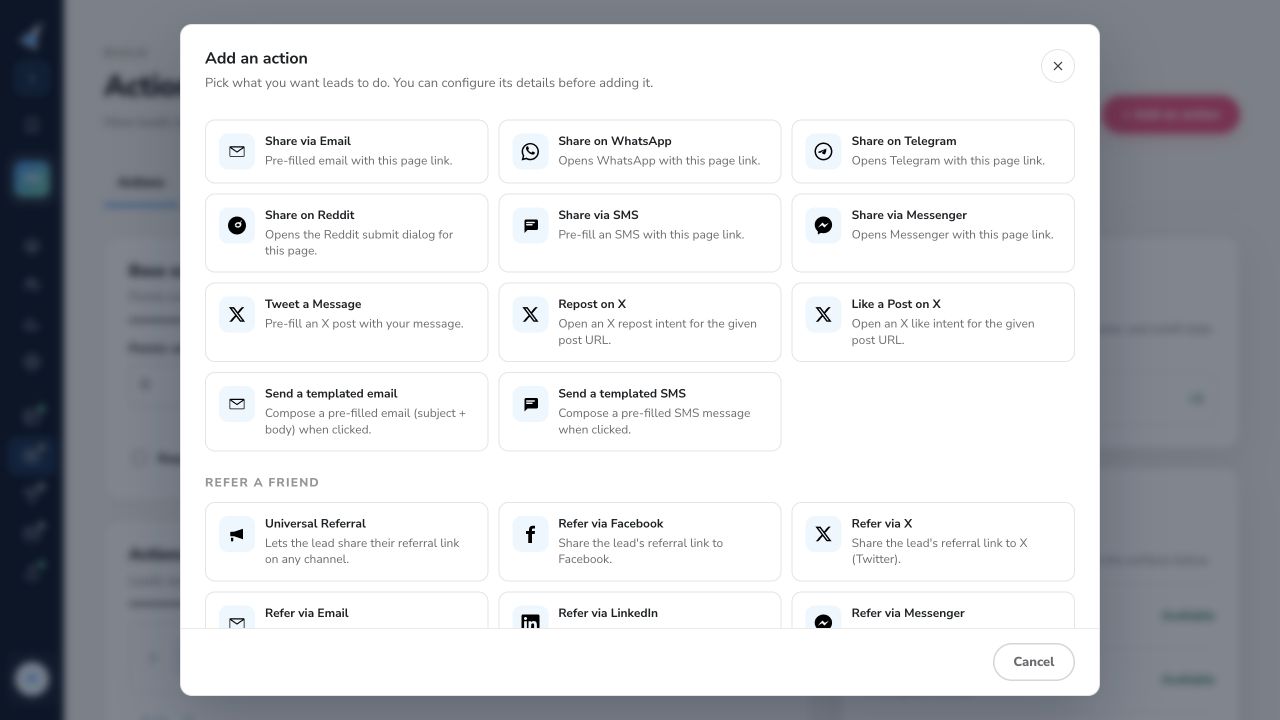
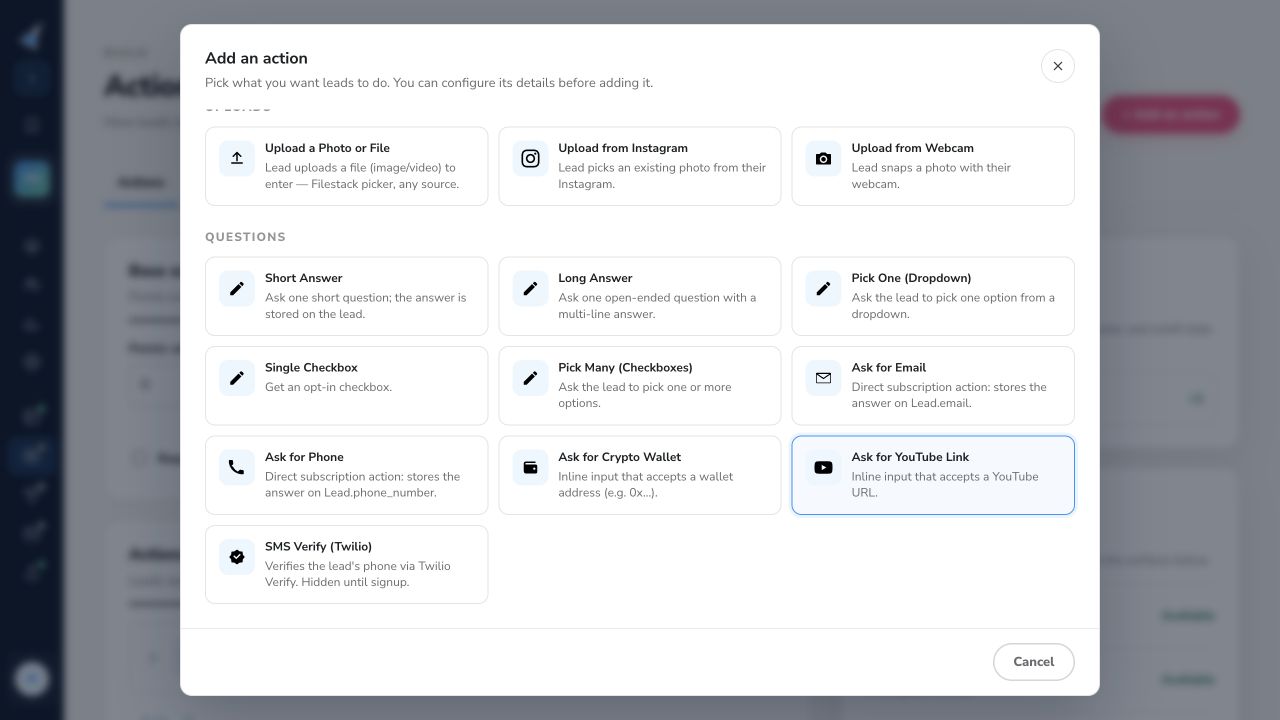
KickoffLabs We’ve listed below a variety of platforms that you can create your first action with: App Download Bandcamp Crypto Discord Email Facebook Form Entry Action(Ask for Phone number, email, or ask a custom question post signup) Indiegogo Instagram Kickstarter LinkedIn Open Link Action Patreon Pinterest Podcast Product Hunt Reddit Refer Friends Online Action Secret Code “Treasure Hunt” Please note - This action requires a paid KickoffLabs Business plan SMS/SMS Verification Spotify Sign up With Google Telegram TikTok Threads Tumblr Twitter Upload Requires a paid Business level or Appsumo Tier 4 and higher plan Weibo Whatsapp Wordpress Youtube Custom HTML Action Please note - This action requires knowledge of writing HTML + a paid KickoffLabs Business plan Custom Lead Tag ActionPlease note - This action requires knowledge of coding/API’s + a paid KickoffLabs Business plan Have an action that you would like to see as an option? Let us know by reaching out to support@kickofflabs.com!

Customizing a Bandcamp Action Leads can now easily share/pin the contest, or engage with…

Section titled “Customizing a Bandcamp Action Leads can now easily share/pin the contest, or engage with…”

your brand, on their favorite social media platforms! Learn more about creating your first KickoffLabs action here.Below is our current offering of actions that can be completed via Bandcamp.

This option awards points when a lead visits your Bandcamp profile. C…

heck out the artist guide for tips on finding your follow link. It generally ends with /follow_me after your main URL.

earn points for visiting bandcamp profile

Customizing a Crypto Action Leads can now easily share/pin the contest, or engage with y…

Section titled “Customizing a Crypto Action Leads can now easily share/pin the contest, or engage with y…”

our brand, on their favorite social media platforms! Learn more about creating your first KickoffLabs action here.Below is our current offering of actions that can be completed for Crypto.

Get Crypto Wallet Address Award points when leads provide their Crypto wallet address.

Section titled “Get Crypto Wallet Address Award points when leads provide their Crypto wallet address.”

earn points for providing crypto wallet address

Customizing a Discord Action Leads can now easily share the contest, or engage with…

Section titled “Customizing a Discord Action Leads can now easily share the contest, or engage with…”

your brand, on their favorite social media platforms! Learn more about creating your first KickoffLabs action here.Below is our current offering of actions that can be completed via Discord.

Join Server Award points to a lead when they accept your Discord invite

Section titled “Join Server Award points to a lead when they accept your Discord invite”

Learn how to get an invite URL for your channel. Remember that by default invite links only last for 24 hours. Be sure to set it not to expire when you generate the code.

discord action

Customizing an Email Action Leads can now easily share the contest, or engage with your…

Section titled “Customizing an Email Action Leads can now easily share the contest, or engage with your…”

brand, on their favorite social media platforms! Learn more about creating your first KickoffLabs action here. Below is our current offering of actions that can be completed via Email.

Send Email This action awards points to leads when they share the contest with their…

Section titled “Send Email This action awards points to leads when they share the contest with their…”

friends via email!

email action

To modify this action follow the path Setup>Action and click Edit next to the Email action. send email action

In the next screen you will be able to update the email body and subject Update action Send email

Refer Friends via an Email When you select the action Refer Friends Online, one of t…

Section titled “Refer Friends via an Email When you select the action Refer Friends Online, one of t…”

he button will be to send an email. The points for this action are automatically taken from the first tab Signups & Refferals because the leads will get the points only after one of the referred people will sign up for the campaign. refer friends - email action

Share Content Links Via Email Share a specific site or blog post via email instead o…

Section titled “Share Content Links Via Email Share a specific site or blog post via email instead o…”

f just sharing your contest. Ideally the page being shared has the KickoffLabs campaign script on it so we can track referrals that sign up from the link.

share non-content url's via email

Have an action that you would like to see as an option? Let us know by reaching out to support@kickofflabs.com!

Customizing a Facebook Action Leads can now easily share the contest, or engage with you…

Section titled “Customizing a Facebook Action Leads can now easily share the contest, or engage with you…”

r brand, on their favorite social media platforms! Learn more about creating your first KickoffLabs action here.Below is our current offering of actions that can be completed via Facebook.

Sign up With Facebook Increase conversions by offering alternative ways of opting into t…

Section titled “Sign up With Facebook Increase conversions by offering alternative ways of opting into t…”

he campaign, such as signing up to the campaign with a Facebook account. A few things to keep in mind while using the Signup With Facebook action:

  • If the signup action is added multiple times, the lead’s signup will only be counted once and any duplicate signup actions will be marked complete.
  • If you also have a page level signup with Facebook button (:separate from our actions) and a lead joins that way, we’ll give them the points for the signup. Please note the email action also works this way as well.
  • If someone signs up via email. Then clicks Facebook signup, and inputs a different email, we’ll credit points to the first email that was used and log the Facebook Email Address as a custom field on the existing lead. This way we don’t create two leads.

signup with Facebook

Visit Page Looking for the “Like a Page” action?

Section titled “Visit Page Looking for the “Like a Page” action?”

Facebook recently retired that action and replaced it with the “Visit us on Facebook” action. Award points for having a lead visit your Facebook Business’ profile. A lead can then optionally take the additional step to like the page.

visit page

View Post Increase your engagement by linking out to a specific Facebook page that y…

Section titled “View Post Increase your engagement by linking out to a specific Facebook page that y…”

ou’d like leads to visit. A lead can check out your post, give it some love, and maybe even leave a comment.

visit post

Refer Friends Award points when a lead shares the contest with their friends on Face…

Section titled “Refer Friends Award points when a lead shares the contest with their friends on Face…”

book.

refer friends on Facebook action

Share Link on Facebook Award points when a lead shares a specific site or blog post…

Section titled “Share Link on Facebook Award points when a lead shares a specific site or blog post…”

on Facebook instead of just sharing your contest. Ideally the page being shared has the KickoffLabs campaign script on it (either Anyform or Campaign Box) so we can track referrals that sign up from the link.

share a non contest url on Facebook!

Refer Friends (FB Messenger) Award points when a lead shares the contest with their…

Section titled “Refer Friends (FB Messenger) Award points when a lead shares the contest with their…”

friends on Facebook Messenger.

Facebook messenger

Section titled “Share Link on FB Messenger Award points when a lead shares a specific site or blog p…”

ost on Facebook Messenger instead of just sharing your contest. Ideally the page being shared has the KickoffLabs campaign script on it (either Anyform or Campaign Box) so we can track referrals that sign up from the link.

Share content on Facebook messenger

Can I Award Points for Liking my Facebook Page?

Section titled “Can I Award Points for Liking my Facebook Page?”

Facebook recently updated their TOS guidelines to restrict incentivizing leads to like a Facebook business page. The changes to the TOS resulted in Facebook retiring the like action (one of Facebook’s social plugins) and replaced it with a “Visit us on Facebook” action. The main difference between the two actions is that the focus will now be geared toward increasing organic reach and giving the lead a choice to take the next step after visiting the page and like the page. This results in better page engagement as the people liking the page are truly interested in the page instead of increasing likes in exchange for points/prizes.

Facebook terms

Facebook (and other social platforms) do not pass data back to KickoffLabs on whether or not the lead followed through with the action (for user privacy and other reasons). For this reason, our actions can only be completed once for points.

Customizing an Instagram Action Leads can now easily share the contest, or engage with y…

Section titled “Customizing an Instagram Action Leads can now easily share the contest, or engage with y…”

our brand, on their favorite social media platforms! Learn more about creating your first KickoffLabs action here. Below is our current offering of actions that can be completed via Instagram.

Visit Account Looking for the “Follow Instagram” action?

Section titled “Visit Account Looking for the “Follow Instagram” action?”

Instagram recently retired that action and replaced it with the “Visit Account” action. Award points for having a lead visit your Instagram. A lead can then optionally take the additional step to follow your account.

visit instagram account action

View Post Increase your engagement by linking out to a specific Instagram post that…

Section titled “View Post Increase your engagement by linking out to a specific Instagram post that…”

you’d like leads to visit. A lead can check out your post, give it some love, and maybe even leave a comment.

view instagram post action

Upload From Instagram Ask leads to upload a file from Instagram (such as uploading a sel…

Section titled “Upload From Instagram Ask leads to upload a file from Instagram (such as uploading a sel…”

fie with your product)! Requires a paid Business level or Appsumo Tier 4 and higher plan

Instagram file upload action

Have an action that you would like to see as an option? Let us know by reaching out to support@kickofflabs.com!

Customizing a LinkedIn Action Leads can now easily share the contest, or engage with you…

Section titled “Customizing a LinkedIn Action Leads can now easily share the contest, or engage with you…”

r brand, on their favorite social media platforms! Learn more about creating your first KickoffLabs action here.Below is our current offering of actions that can be completed via LinkedIn.

Follow Award points for having a lead follow your LinkedIn business profile.

Section titled “Follow Award points for having a lead follow your LinkedIn business profile.”

follow on LinkedIn action

Share Content This is different than referring friends

Section titled “Share Content This is different than referring friends”

You could ask a lead to share a specific site or blog post on LinkedIn instead of just sharing your campaign.

share content LinkedIn action

This option awards points when a lead shares the contest via LinkedIn.

refer friends LinkedIn action

Customizing a Pinterest Action Leads can now easily share/pin the contest, or engage wit…

Section titled “Customizing a Pinterest Action Leads can now easily share/pin the contest, or engage wit…”

h your brand, on their favorite social media platforms! Learn more about creating your first KickoffLabs action here.Below is our current offering of actions that can be completed via Pinterest.

This option awards points when a lead shares the campaign via Pinteres…

t.

Pinterest sharing action

Visit Pinterest Award points to leads when they visit your Pinterest profile!

Section titled “Visit Pinterest Award points to leads when they visit your Pinterest profile!”

Visit Pinterest profile for points

Customizing an SMS Action Leads can now easily share the contest, or engage with your br…

Section titled “Customizing an SMS Action Leads can now easily share the contest, or engage with your br…”

and, on their favorite social media platforms! Learn more about creating your first KickoffLabs action here.Below is our current offering of actions that can be completed via SMS.

Refer Friends Award points to a lead when they share the contest via text.

Section titled “Refer Friends Award points to a lead when they share the contest via text.”

share sms

Send SMS Award points to a lead when they text about your contest

Section titled “Send SMS Award points to a lead when they text about your contest”

The default share message can be set from the action’s setting.

send sms action

Section titled “SMS - Share Content Link Award leads points when they share a specific site or blog…”

post via SMS instead of just sharing your contest. Ideally the page being shared has the KickoffLabs campaign script on it so we can track referrals that sign up from the link.

share sms content

Award points to leads who verify their phone number via Twilio. See Setup SMS contest messages with your campaign for the full setup steps. Once you’ve turned on the Twilio integration, the SMS action should begin to appear in the list of actions. When a lead signs up, they’ll receive a verification code from Twilio via SMS to place into the KickoffLabs SMS action. At this time, we require the actions to be added to your KickoffLabs pages/Contest Box, or verified through the SMS/API workflow described in the SMS setup article.

twilio kol sms action

Leads that have verified will show as verified with a green check mark as-well as show as having completed the verification action from the lead section in your KickoffLabs dashboard.

Customizing a TikTok Action Leads can now easily share the contest, or engage with your…

Section titled “Customizing a TikTok Action Leads can now easily share the contest, or engage with your…”

brand, on their favorite social media platforms! Learn more about creating your first KickoffLabs action here.Below is our current offering of actions that can be completed via TikTok.

Watch Video Award leads for watching a specific TikTok video.[ Learn more on how to…

Section titled “Watch Video Award leads for watching a specific TikTok video.[ Learn more on how to…”

grab the TikTok embed script here](https://developers.tiktok.com/doc/embed-videos/).

watch TikTok action

Visit Profile Award points for having a lead visit your TikTok profile

Section titled “Visit Profile Award points for having a lead visit your TikTok profile”

A lead can then optionally take the additional step to follow your account.

visit TikTok action

Customizing a Tumblr Action Leads can now easily share the contest, or engage with your…

Section titled “Customizing a Tumblr Action Leads can now easily share the contest, or engage with your…”

brand, on their favorite social media platforms! Learn more about creating your first KickoffLabs action here.Below is our current offering of actions that can be completed via Tumblr.

Refer Friends Award points when a lead shares the contest on Tumblr!

Section titled “Refer Friends Award points when a lead shares the contest on Tumblr!”

Tumblr share action

Customizing an X Action Leads can now easily share the contest, or engage with your bran…

Section titled “Customizing an X Action Leads can now easily share the contest, or engage with your bran…”

d, on their favorite social media platforms! Learn more about creating your first KickoffLabs action here. Below is our current offering of actions that can be completed via X.

Follow Account Award points for having a lead follow your business profile on X.

Section titled “Follow Account Award points for having a lead follow your business profile on X.”

follow X account

Send A Post Award points for having a lead post about your contest

Section titled “Send A Post Award points for having a lead post about your contest”

The default share message (what the lead posts) can be set from the action’s setting.

X send post

Repost a Post Different than the “Send a Post” action, “Repost a Post” allows a lead…

Section titled “Repost a Post Different than the “Send a Post” action, “Repost a Post” allows a lead…”

to retweet one of your existing posts. Simply enter the URL to the post in the action’s setting.

X repost a post

This option will award points when the lead shares the campaign on X.

Share with friends on X

Like a Post Boost your engagement by awarding points for liking a specific post!

Section titled “Like a Post Boost your engagement by awarding points for liking a specific post!”

like a post on x

Share Content Link on X Award points when a lead shares a specific site or blog post…

Section titled “Share Content Link on X Award points when a lead shares a specific site or blog post…”

on X instead of just sharing your contest. Ideally the page being shared has the KickoffLabs campaign script on it so we can track referrals that sign up from the link.

share content on X

Customizing a Youtube Action Leads can now easily share the contest, or engage with your…

Section titled “Customizing a Youtube Action Leads can now easily share the contest, or engage with your…”

brand, on their favorite social media platforms! Learn more about creating your first KickoffLabs action here.Below is our current offering of actions that can be completed via Youtube.

Watch Video Award points when a lead clicks the action to watch a specific video on…

Section titled “Watch Video Award points when a lead clicks the action to watch a specific video on…”

YouTube. The video URL can be set from the action’s setting.

watch YouTube video action

Subscribe to Channel Award points when a lead subscribes to your Youtube channel.

Section titled “Subscribe to Channel Award points when a lead subscribes to your Youtube channel.”

subscribe to YouTube action

Visit Channel Award points when a lead visits your Youtube channel.

Section titled “Visit Channel Award points when a lead visits your Youtube channel.”

visit YouTube action

Upload a Youtube Video Award points to leads when they submit a Youtube video URL.

Section titled “Upload a Youtube Video Award points to leads when they submit a Youtube video URL.”

award points for YouTube video upload

Customizing Goodreads Actions Leads can now easily share the contest, or engage with you…

Section titled “Customizing Goodreads Actions Leads can now easily share the contest, or engage with you…”

r brand, on their favorite social media platforms! Learn more about creating your first KickoffLabs action here.Below is our current offering of actions that can be completed via Goodreads.

Follow on Goodreads Award points when a lead follows your Goodreads profile.

Section titled “Follow on Goodreads Award points when a lead follows your Goodreads profile.”

follow on Goodreads action

Customizing a Google Action Leads can now easily share the contest, or engage with your…

Section titled “Customizing a Google Action Leads can now easily share the contest, or engage with your…”

brand, on their favorite social media platforms! Learn more about creating your first KickoffLabs action here.Below is our current offering of actions that can be completed via Google.

Sign up With Google Increase conversions by offering alternative ways of opting into the…

Section titled “Sign up With Google Increase conversions by offering alternative ways of opting into the…”

campaign, such as signing up to the campaign with a Google account. A few things to keep in mind while using the Signup With Google action:

  • If the signup action is added multiple times, the lead’s signup will only be counted once and any duplicate signup actions will be marked complete.
  • If you also have a page level signup with Google button (separate from our actions) and a lead joins that way, we’ll give them the points for the signup (if the Google action is also enabled). Please note the email action also works this way as well.
  • If someone signs up via email. Then clicks Google signup, and inputs a different email, we’ll credit points to the first email that was used and log the Google Email Address as a custom field on the existing lead. This way we don’t create two leads.

google signup button

Have any questions? Reach out to support@kickoffLabs.com via email for assistance!

Customizing Indiegogo Actions Leads can now easily share the contest, or engage with you…

Section titled “Customizing Indiegogo Actions Leads can now easily share the contest, or engage with you…”

r brand, on their favorite social media platforms! Learn more about creating your first KickoffLabs action here.Below is our current offering of actions that can be completed via Indiegogo.

Visit Indiegogo Campaign Award points when a lead visits your Indiegogo campaign

Section titled “Visit Indiegogo Campaign Award points when a lead visits your Indiegogo campaign”

Please note that backings/purchases cannot be tracked as Indiegogo currently doesn’t support tracking scripts on their pages.

Visit Indiegogo campaign

Customizing a Kickstarter Action Leads can now easily share/pin the contest, or engage w…

Section titled “Customizing a Kickstarter Action Leads can now easily share/pin the contest, or engage w…”

ith your brand, on their favorite social media platforms! Learn more about creating your first KickoffLabs action here. Below is our current offering of actions that can be completed via Kickstarter.

This option awards points when a lead visits your Kickstarter camp…

aign. Please note that Kickstarter does not have an option to track making the backing/purchase as they don’t allow third party scripts to be installed.

visit a kickstarter campaign for points

Section titled “Customizing an Open Link Action With the Open Link Action for contest you can reward…”

leads for opening a selected link. Learn more about creating your first KickoffLabs action here.

Section titled “Open Link Action Award points when a lead opens the link which you have defined for this…”

action. Open Link Action - view

The Form Entry actions are added in the same way as all other actions. Follow the path Setup>Actions and then click “Add a New Action“.

action editor

Then select Open Link Action, enter the link you want the leads to open and click “Save Action“. Open Link Action

Customizing a Patreon Action Leads can now easily share/pin the contest, or engage with…

Section titled “Customizing a Patreon Action Leads can now easily share/pin the contest, or engage with…”

your brand, on their favorite social media platforms! Learn more about creating your first KickoffLabs action here.Below is our current offering of actions that can be completed via Patreon.

This option awards points when a lead visits a Patreon profile.

visit pattern for points

Customizing a Podcast Action Leads can now easily share/pin the contest, or engage with…

Section titled “Customizing a Podcast Action Leads can now easily share/pin the contest, or engage with…”

your brand, on their favorite social media platforms! Learn more about creating your first KickoffLabs action here.Below is our current offering of actions that can be completed via Podcast.

This option awards points when a lead visits your Podcast.

earn posts for visiting podcast

Customizing a Product Hunt Actions Leads can now easily share the contest, or engage wit…

Section titled “Customizing a Product Hunt Actions Leads can now easily share the contest, or engage wit…”

h your brand, on their favorite social media platforms! Learn more about creating your first KickoffLabs action here.Below is our current offering of actions that can be completed via Product Hunt.

Follow on Product Hunt Award points when a lead follows your Product Hunt profile.

Section titled “Follow on Product Hunt Award points when a lead follows your Product Hunt profile.”

follow ph profile

Vote for Project on Product Hunt Award points when a lead votes for your project on…

Section titled “Vote for Project on Product Hunt Award points when a lead votes for your project on…”

Project Hunt.

vote for project on product hunt

Customizing a Refer Friends Action Leads can now easily share the contest, or engage…

Section titled “Customizing a Refer Friends Action Leads can now easily share the contest, or engage…”

with your brand, on their favorite social media platforms! Learn more about creating your first KickoffLabs action here. “Refer Friends” action is added by default to all contests in KickoffLabs.

Refer Friends Award points when a lead shares the contest with their friends on soci…

Section titled “Refer Friends Award points when a lead shares the contest with their friends on soci…”

al media platforms and a friend signs up for the contest.

Refer friends action

How Does Scoring For Refer Friends Action Work?

Section titled “How Does Scoring For Refer Friends Action Work?”
  • The lead shares the link.
  • A lead’s friend clicks the link and signs up for the campaign.
  • The lead receives number of points defined in the scoring settings. scoring settings

Note: The points are only awarded when a valid referral is generated.

  • In Action tab you can add more social networks to the defaulted 3 icons (Facebook, X and email) by clicking “Editrefer friends online action point

  • Then click an arrow next to “Add Network” to add additional sharing option

add a social network

  • Once you selected the desired additional sharing option, click “Add Network”. Repeat the process until you add all the options you need and click “Save Action”.
  • When you edit the landing page you can choose to have the “Refer Friends” action expanded by default. If you deselect it, the “Refer Friends” action will be shown as a single line and a visitor will need to click the arrow in the far right to see what sharing options are available. expand refer friends action

The default share text/images for the campaign can be set up either on the campaign level or on page level.

Customizing Secret Code Action With the Secret Code action for contests you can reward l…

Section titled “Customizing Secret Code Action With the Secret Code action for contests you can reward l…”

eads for locating a secret code and inputting it into the action field on their unique status page. The Secret Code action is a validated field that awards points only if the lead enters a matching code to what you have set for the action.

Secret code action.

Please Note: This action is currently only available on Business level and higher plans. Example Uses:

  • Run a treasure hunt by hiding a secret code on a page/section of a website or in a social post
  • Incentivize participation at events by providing a code to enter for points The Secret Code action is added in the same way as all other actions. Follow the path ***Setup > Actions and then click “Add a New Action.” ***

Add a new action.

Then select the Secret Codes action.

Add a secret code action.

From here, you can set the amount of points to award for completing the action, customize the call to action text that’s displayed to the lead, and set the secret code.

Secret code action settings.

A few things to note:

  • We currently support one secret code tied to one Secret Code action.
  • Additional codes can be added by simply adding additional Secret Code actions from the Actions page.
  • Secret Code actions can be “expired” or turned off by unchecking the “Action Enabled?” box via the Secret Code action settings page. This will hide the action from the UI(lead’s view) while preserving any data/points. Deleting the action entirely would also delete any point data associated and rescore the campaign.

Disable secret code action.

Have any questions? Reach out to our support team at support@kickofflabs.com :)

Customizing a Spotify Action Leads can now easily share/pin the contest, or engage with…

Section titled “Customizing a Spotify Action Leads can now easily share/pin the contest, or engage with…”

your brand, on their favorite social media platforms! Learn more about creating your first KickoffLabs action here.Below is our current offering of actions that can be completed via Spotify.

This option awards points when a lead follows…

a Spotify artist/user/show etc.

follow on Spotify for points

Listen to Track on Spotify Award points when a lead listens to a specific track.

Section titled “Listen to Track on Spotify Award points when a lead listens to a specific track.”

listen to a track on Spotify for points

Customizing a Threads Action Leads can now easily engage with your brand, on their favor…

Section titled “Customizing a Threads Action Leads can now easily engage with your brand, on their favor…”

ite social media platforms! Learn more about creating your first KickoffLabs action here. Below is our current offering of actions that can be completed via Threads.

Visit Threads Profile Looking for the “Follow-us” action?

Section titled “Visit Threads Profile Looking for the “Follow-us” action?”

Meta retired that action and replaced it with the “Visit us” action across all of their platforms. Award points for having a lead visit your Threads profile. A lead can then optionally take the additional step to follow you.

visit threads action

Customizing an Upload Action With the upload actions for contests you can award leads fo…

Section titled “Customizing an Upload Action With the upload actions for contests you can award leads fo…”

r uploading a file. For example, you can ask a lead to upload a receipt of their purchase, UGC content for your brand and more! Please note this action is currently only available on single page campaigns and is not supported on stand alone status pages.Requires a paid Business level or Appsumo Tier 4 and higher plan

Upload file actions

The Upload File actions are added the same way as all other actions. Follow the path** Setup>Actions** and then click “Add a New Action”.

add a new action

Then select one of the Upload actions from the dropdown.

choose an upload action

For example you can request a lead take an image with their devices camera and upload it, upload directly from instagram, or upload a file from their device. Once uploaded, the lead will earn the points defined for this action. Learn more about the Instagram upload action here.

upload file screen

Please note, the upload actions require the lead to sign-up first before completing. If they haven’t signed up yet, they’ll see the below error message.

KickoffLabs error message

Have any questions? Reach out to our support team at support@kickofflabs.com

Customizing a Form Entry Actions With the Form Entry actions for contests you can re…

Section titled “Customizing a Form Entry Actions With the Form Entry actions for contests you can re…”

ward leads for providing you more information. They help you to keep your form simple while rewarding the leads that are willing to give you more information.

KickoffLabs form entry actions

The Form Entry actions are added in the same way as all other actions. Follow the path Setup>Actions and then click “Add a New Action”.

Add a new action.

Then select one of the Form Entry actions from the dropdown.

form entry dropdown

For example you can add a request for phone number. Once this is filled out, the lead will win the points defined for this action, in the example below it will be 5 points. add your phone number

We currently supporting the following post signup form entry actions:

  • Phone Number
  • Email
  • Single Line Text Text (great for when you’re asking for a brief sentence/word).
  • Story/Multi Line Text (great for asking leads to enter a story/paragraph).
  • Dropdown Choice (ask the lead to choose an option from a dropdown).
  • Multiple Choice (ask the lead a multiple choice question).
  • Checkbox (A single checkbox option)
  • If you’re looking for a long format survey option, we recommend using a tool like Typeform. You can learn about integrating Typeform with KickoffLabs here. Have any questions? Reach out to our support team at support@kickofflabs.com

If you have working knowledge of code, you can configure to award points for actions taken outside of Kickofflabs, such as completing a survey, making a purchase, or creating an account.

To get started, select “Custom/Lead Tag” ?

“Complete Lead Tag”from the Actions drop-down. You will then be able to select a lead tag, or add a new one if this is your first, and configure additional settings such as the Font Awesome icon class and call to action text.

configure-action

Lead Tag Completion Scoring Details Lead tag actions are only marked as completed when t…

Section titled “Lead Tag Completion Scoring Details Lead tag actions are only marked as completed when t…”

he lead tag associated with the action is applied to the lead. There are a few options to tag a lead and apply points:

edit lead card to complete lead tag action

Notes about tagging leads: The tag call does NOT have to be made on existing leads

Section titled “Notes about tagging leads: The tag call does NOT have to be made on existing leads”

** If you called the tag script with a lead that’s not in your contest we would then add them to the contest with the tag used. The social ID/KID/Kolid can be used in place of email if you know the KOL ID of the person you want to tag.

Customizing a Wordpress Action Leads can now easily share the contest, or engage wit…

Section titled “Customizing a Wordpress Action Leads can now easily share the contest, or engage wit…”

h your brand, on their favorite social media platforms! Learn more about creating your first KickoffLabs action here.Below is our current offering of actions that can be completed via Wordpress.

Refer Friends Award points when a lead shares the contest with their friends on Word…

Section titled “Refer Friends Award points when a lead shares the contest with their friends on Word…”

press.

Wordpress share action

Have an action that you would like to see as an option? Let us know by reaching out to support@kickofflabs.com!

Customizing Download App Action on KickoffLabs

Section titled “Customizing Download App Action on KickoffLabs”

Customizing an App Action Award points to leads who download your app from the Apple/Goo…

Section titled “Customizing an App Action Award points to leads who download your app from the Apple/Goo…”

gle app stores! The lead is awarded points based off of the intent, meaning that we cannot verify whether the lead followed through with completing the download. Learn more about creating actions here.

app download

The app download action is intent based (button click) as we do not have a way to validate if a lead completely downloads the app onto their device or not. Tracking App installs is a complex problem that we don’t currently tackle, however, there are 3rd party tracking providers that can create deep links. Any deep link can be used in the KickoffLabs app download action for advanced tracking.

KickoffLabs Nudge Bar is designed to get visitors and leads to take the next step in your funnel by promoting it as a bar on your website. If the visitor was referred by a friend, the referrer’s name will appear in the bar as having invited them to join your campaign!

kickofflabs nudge bar

Getting Started With Nudge Bar From the “More Growth Tools” section of your campaign…

Section titled “Getting Started With Nudge Bar From the “More Growth Tools” section of your campaign…”

dashboard, select the Nudge Bar to begin editing.

select the nudge bar to edit

Next, you’ll be taken to the Nudge Bar editor where you can:

  • Enable Invited By - This turns the Nudge Bar on
  • Change the text color
  • Change the background color
  • Customize the text that appears in the Nudge Bar

Nudge bar editor

Once you’ve customized the Nudge Bar settings, save your settings at the bottom of the settings page. Then, toggle the “Enable Invited By” setting to on. This displays the Nudge Bar live.

KickoffLabs landing page, the nudge bar will begin to automatically display (this can take up to 5 minutes to go live) after setting the “Enable Invited By” setting to on. If you have an external landing page, simply copy the script on the right side of the page and paste it into the header area of the page you’d like Nudge Bar to display on. If you already are integrated to KickoffLabs via Anyform/Contest Box, no need to install this script again as it’s the same script that’s used with Anyform/Contest Box.

nudge bar install script

If you have any questions, please reach out to our support team at support@kickofflabs.com!

Customizing Reddit Actions Leads can now easily share the contest or engage with you…

Section titled “Customizing Reddit Actions Leads can now easily share the contest or engage with you…”

r brand on their favorite social media platforms! Learn more about creating your first KickoffLabs action here. Below is our current offering of actions that can be completed via Reddit.

Refer Friends Award points when a lead shares the contest with their friends on Redd…

Section titled “Refer Friends Award points when a lead shares the contest with their friends on Redd…”

it.

reddit action

Reddit - Visit Community Award points when the lead visits community on Reddit

Section titled “Reddit - Visit Community Award points when the lead visits community on Reddit”

Visit the Reddit Community

Reddit - Share Link Share a specific site or blog post on Reddit instead of just sharing…

Section titled “Reddit - Share Link Share a specific site or blog post on Reddit instead of just sharing…”

your contest. Ideally, the page being shared has the KickoffLabs campaign script on it so we can track referrals that sign up from the link.

Share blog posts on Reddit

Have an action that you would like to see as an option? Let us know by reaching out to support@kickofflabs.com!

Customizing a Telegram Action Leads can now easily share the contest, or engage with…

Section titled “Customizing a Telegram Action Leads can now easily share the contest, or engage with…”

your brand, on their favorite social media platforms! Learn more about creating your first KickoffLabs action here.Below is our current offering of actions that can be completed via Telegram.

Refer Friends Award points when a lead shares the contest with their friends on Tele…

Section titled “Refer Friends Award points when a lead shares the contest with their friends on Tele…”

gram.

telegram share action

Section titled “Share Content Link on Telegram Award points when a lead shares a specific site or bl…”

og post on Telegram instead of just sharing your contest. Ideally the page being shared has the KickoffLabs campaign script on it so we can track referrals that sign up from the link.

share content links on telegram

Join Group on Telegram Award points when a lead joins your Telegram group!

Section titled “Join Group on Telegram Award points when a lead joins your Telegram group!”

join telegram group

Have an action that you would like to see as an option? Let us know by reaching out to support@kickofflabs.com!

Customizing a Weibo Action Leads can now easily share the contest, or engage with yo…

Section titled “Customizing a Weibo Action Leads can now easily share the contest, or engage with yo…”

ur brand, on their favorite social media platforms! Learn more about creating your first KickoffLabs action here.Below is our current offering of actions that can be completed via Weibo.

Refer Friends Award points when a lead shares the contest with their friends on Weib…

Section titled “Refer Friends Award points when a lead shares the contest with their friends on Weib…”

o.

Weibo share action

Have an action that you would like to see as an option? Let us know by reaching out to support@kickofflabs.com!

Customizing a WhatsApp Action Leads can now easily share the contest, or engage with…

Section titled “Customizing a WhatsApp Action Leads can now easily share the contest, or engage with…”

your brand, on their favorite social media platforms! Learn more about creating your first KickoffLabs action here.Below is our current offering of actions that can be completed via WhatsApp.

Refer Friends Award points when a lead shares the contest with their friends on What…

Section titled “Refer Friends Award points when a lead shares the contest with their friends on What…”

sApp.

WhatsApp sharing action

Share Content on WhatsApp Share a specific site or blog post on WhatsApp instead of…

Section titled “Share Content on WhatsApp Share a specific site or blog post on WhatsApp instead of…”

just sharing your contest. Ideally the page being shared has the KickoffLabs campaign script on it so we can track referrals that sign up from the link.

share content urls on WhatsApp

Have an action that you would like to see as an option? Let us know by reaching out to support@kickofflabs.com!

If you have working knowledge of HTML, you can configure to award points for actions taken outside of Kickofflabs, such as completing a survey.

To get started, select “Custom/Lead Tag” > “HTML Action” from the Actions drop-down. You will then be able to enter the HTML for the action and configure additional settings such as the Font Awesome icon class and call to action text.

html action

HTML For Action Details Whatever you add to this section will be shown when the action i…

Section titled “HTML For Action Details Whatever you add to this section will be shown when the action i…”

s expanded. Note that you could break the entire contest box with bad HTML here. So we don’t suggest using this action unless you are comfortable taking that chance.

There are three scoring options:

  • On expansion - points will be awarded when they expand the action. This may be helpful if you just want them to view a custom bit of content.
  • When a link with a specific class in the HTML Action Details is clicked - This means you’d write custom HTML details that included a link/button with the class “kol-detail-click-points”
  • No automatic points - In this case the action won’t ever show completed. You can use a lead tag or bonus points to reward the person for whatever they did after the fact.
Section titled “Sample Custom HTML Action with Link That Awards Points This code an example of HTML you…”

could add to the custom HTML action that would award points when the button is clicked.

  • Preview the campaign or page after making changes.
  • Submit a fresh test lead when the change affects forms, referrals, points, integrations, or tracking.
  • Save the campaign URL, test lead email, screenshots, and any error messages before contacting support.

Need help? Email support@kickofflabs.com with your campaign URL, the lead email you tested with, and a screenshot of what you expected to happen.