

Understand campaign reports and ROI
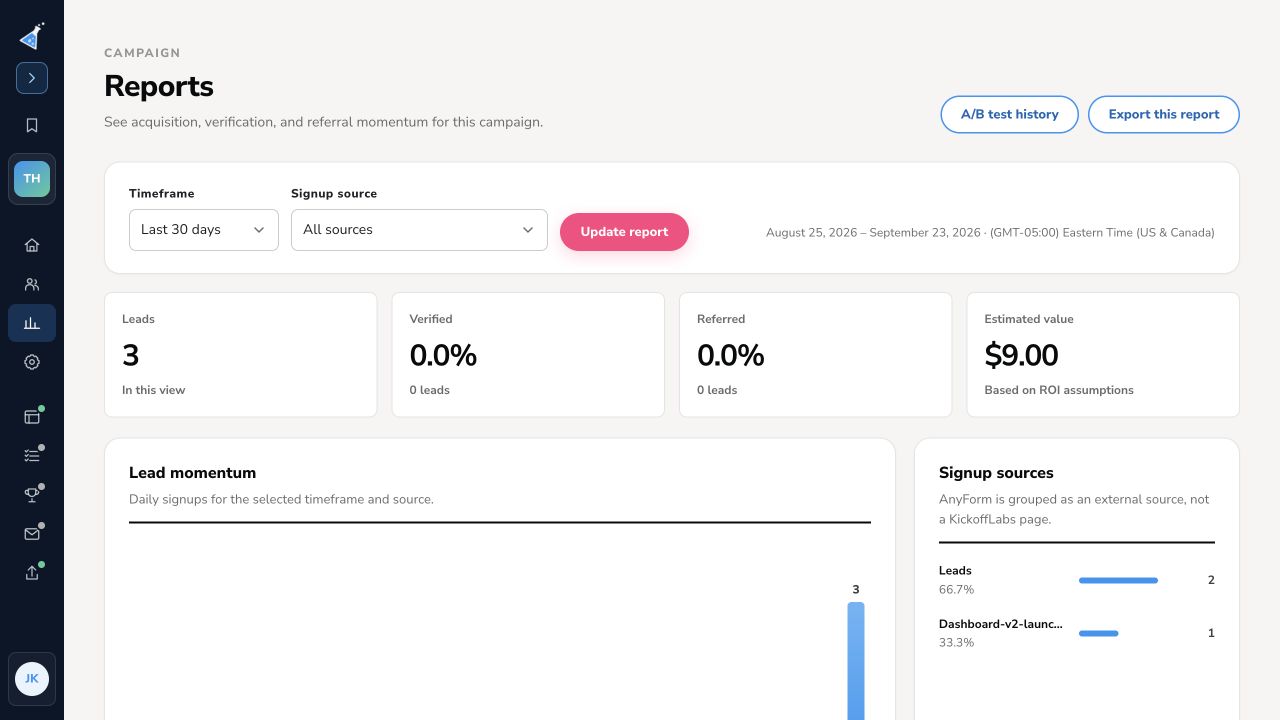
Open a campaign and select Reports. This view helps you see lead growth, where signups originated, verification and referral activity, and an estimated value based on assumptions you control.
Choose the view
Section titled “Choose the view”Select a Timeframe and Signup source, then Update report. The date range and campaign timezone appear above the results. All sources combines campaign sources; you can choose a specific page or external source to narrow the view.
Read the results
Section titled “Read the results”- Leads is the number of signups in the selected view. Verified and Referred summarize lead quality and referral contribution.
- Lead momentum shows daily signups for the period. Select View accessible daily data for the underlying daily values.
- Signup sources shows how the signups were distributed. AnyForm is grouped as an external source rather than a KickoffLabs page.
- Campaign quality summarizes verified leads, leads who referred someone, leads from referrals, and excluded or fraudulent leads.
- Estimated value uses the Value assumptions below the report. Set values for direct leads, referred leads, shared-page views, and share clicks, then select Save ROI assumptions. These are estimates for reporting; billing and plan usage do not read them.
Use Export this report to download the current reporting view. Select A/B test history for current and completed page experiments. To investigate an individual signup, open its lead profile.
Need help? Email support@kickofflabs.com with your campaign URL, timeframe, source filter, and the value you expected.