

Check social follows before you award prizes
Most social networks don’t let any app confirm that someone followed an account. So when a follow action earns entries, KickoffLabs credits the click on your link, not the follow itself.
To make follows checkable, a follow action can ask for the entrant’s username on that network. You then have a name to look up before you award a prize, and entrants know you’ll check.
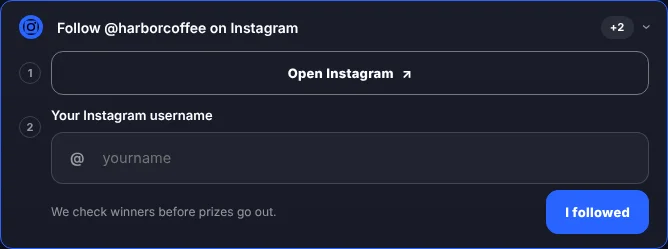
Which actions can ask for a username
Section titled “Which actions can ask for a username”Follow and visit actions for these networks:
- TikTok
- X
- Threads
- YouTube (visit and subscribe)
- Twitch
- Telegram
- Discord
Choose how the action works
Section titled “Choose how the action works”| Setting | What entrants do |
|---|---|
| Required before points | Open your profile, then enter their username. No entries until they give one. |
| Optional, points on click | Get entries for the click, and can add their username too. |
| Don’t ask, points on click | Get entries for the click. This is how follow actions worked before. |
New campaigns made in the KickoffLabs designer start with Required before points. Follow actions in older campaigns keep Don’t ask until you change them.
-
Open the campaign and select Scoring & actions in the left menu.
-
Select Edit on the follow action.
-
Pick an option under Ask for their username, then select Save action.
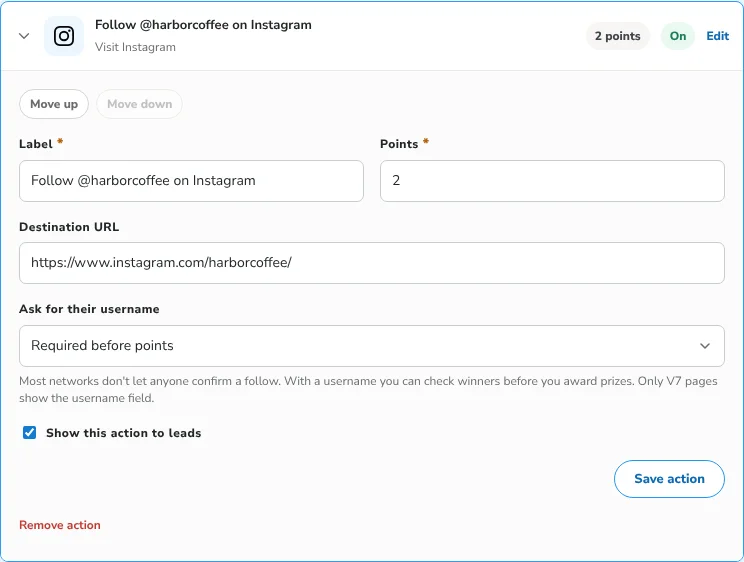
Your pages update on their own. The username field only shows on pages made in the KickoffLabs designer. Classic pages have no field, so Required gives no entries there. Use Optional or Don’t ask for actions on classic pages.
What entrants see
Section titled “What entrants see”The row has two steps: open your profile, then type their username. The @ is already there, and people can paste their profile link instead. KickoffLabs keeps just the name.
If someone presses I followed without a name, the row asks for one and gives no entries.
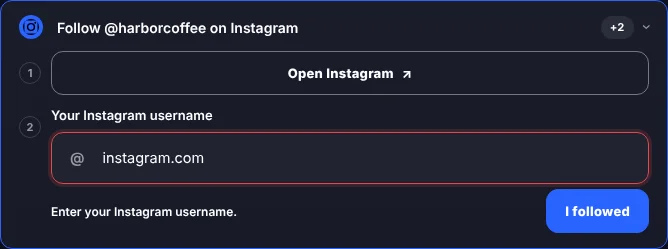
Once saved, the row shows the name. Entrants can reopen it and fix a typo within an hour of completing the action. Fixing a name doesn’t add entries again.

Check a lead’s follows
Section titled “Check a lead’s follows”Open the lead from Leads. Under Completed actions, each follow shows the username as a link to that profile.
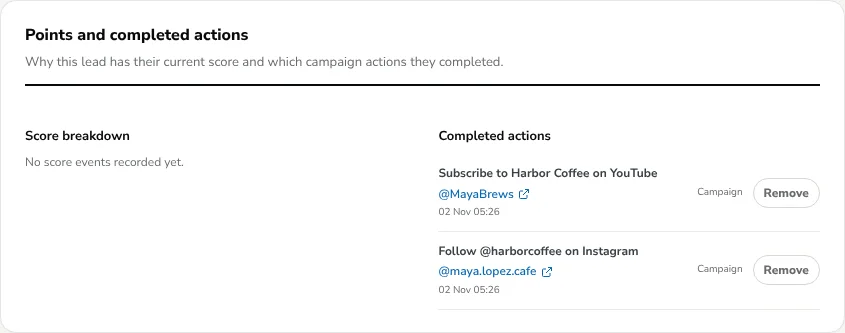
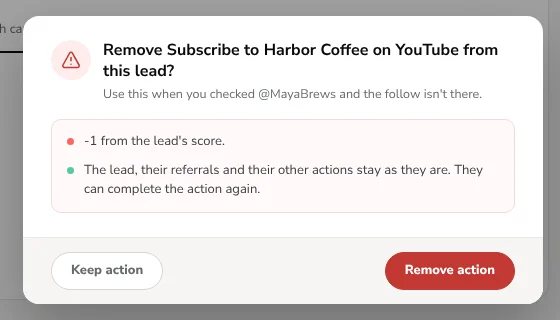
If the follow isn’t there, select Remove. The entries from that action come off the lead’s score. Their referrals and other actions stay, and they can complete the action again.
When you pick a random winner, the result lists each winner’s follow usernames, so you can check them before you announce anyone.
Social network rules
Section titled “Social network rules”Follow actions send people to another company’s site, and each network has its own rules for promotions. Read them before you build a giveaway around follows.
- Facebook: Meta doesn’t allow rewarding people for liking a Facebook Page. Its promotion rules for Pages also ban entries for sharing to a personal Timeline or tagging friends. Use Visit Facebook Page to send traffic, and don’t promise entries for a like. See Meta’s Pages, Groups and Events policies and Meta’s platform policy.
- Instagram: the promotion guidelines don’t forbid follow-to-enter, but they do require official rules, a release of Instagram by each entrant, and a statement that Instagram doesn’t sponsor the promotion. Instagram promotion guidelines
- Other networks: TikTok, X, YouTube and the rest have their own promotion rules. Check the current version on each network’s site.
This isn’t legal advice. Your official rules should say how entries are earned and that you check follows before awarding prizes.
- Say “We check every winner” in your page copy so entrants know a fake follow won’t count.
- Ask for usernames on the networks you can actually check. A private Discord or Telegram group may need you to look at your member list.
- Set points for joining, referrals and actions.
- See every action you can add.
Need help? Email support@kickofflabs.com with your page URL and the follow action you want to check.