

Change which merge fields are required in MailChimp
This guide walks through change which merge fields are required in mailchimp for integrations and lead sync.
A common question: “How do I change the required merge field settings in MailChimp?” Click here for the full MailChimp setup instructions.
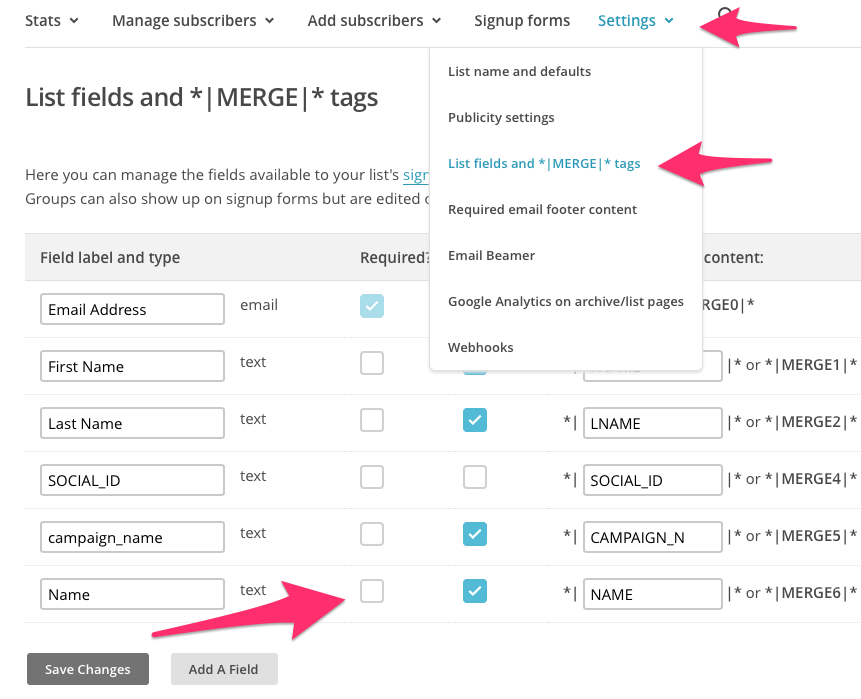
- Log in to MailChimp and find your selected list
- Under settings select ‘List fields and |MERGE| tags’ From here, you will need to UNCHECK ‘Required’ for form field data you do not capture in KickoffLabs if you want to be able to sync your leads.
What to check after
Section titled “What to check after”- Confirm the setting, export, integration, or message changed where you expected in KickoffLabs.
- If this affects leads, forms, referrals, emails, or integrations, submit a fresh test lead and verify the result end-to-end.
- Save the campaign URL, test lead email, screenshots, and any error messages before contacting support.
Need help? Email support@kickofflabs.com with your campaign URL, the lead email you tested with, and a screenshot of what you expected to happen.